Command search.
Search for and run Altar Tools, effects, presets and extensions.
What it does
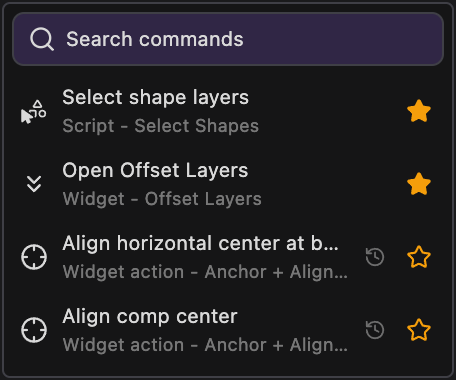
Click Search commands and type to find an Altar Tool or one of its actions, your own buttons, an expression, an After Effects effect, a preset from your User Presets folder or another installed extension, then click it to run it. Star the commands you use most to keep them on the widget, next to the ones you ran recently.
Details
- Category: General Tools
- Kind: Widget
- Available since: Altar 0.5.1
- Also searched as: command, search, favorite, recent, launcher
Guide
Search
Click Search commands to open the search, then type part of a name. Results update as you type. Click a result to run it, or use the arrow keys and press Enter.
Use the Type filter to narrow the list to one kind of command:
- Scripts: one-click Altar Tools and your own buttons. A Tool’s Shift, Alt or Ctrl/Cmd action shows up as its own command, so you can run it without holding the key.
- Widgets: opens that widget’s controls.
- Widget actions: single actions inside a widget, such as a single Primitives button.
- Expressions: applies a ready-made expression to the selected properties.
- Effects: adds a native After Effects effect to the selected layers.
- Presets: applies an animation preset from your User Presets folder to the selected layers.
- Menu commands: runs an After Effects menu command.
- Extensions: opens another installed extension panel.
Presets and extensions are found on disk each time you open the search.
Favorites and recent
Click the star on a command to make it a favorite. With an empty search box, the list shows your favorites first and then the commands you ran recently. The widget itself shows the first ten of those, so you can run them with one click without opening the search.