Pre-render Comp.
Render a heavy comp once for fast previews, with the live layers kept underneath.
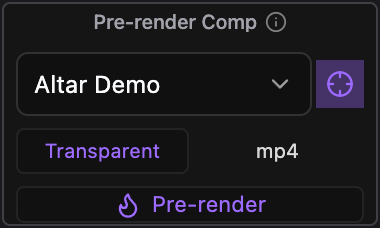
What it does
Renders a comp’s work area to a file and places it as a soloed layer on top, so previews and every comp it is nested in stop recalculating it. The original layers stay untouched underneath: switch back to them to make changes, then show the pre-render again without rendering.
Controls
- Click: Pre-render the target comp / toggle it
Details
- Category: Composition Tools
- Kind: Widget
- Available since: Altar 0.1.0
- Also searched as: pre-render, prerender, bake, precomp, render, proxy, composition, cache, speed
Guide
Before you start
- Save the project. Pre-renders are written to an
Altar/Pre-rendersfolder next to the project file, and imported into a matching folder in the Project panel. - Un-solo any layers in the comp you want to pre-render.
- Set the comp’s work area to the part you need. Only the work area is rendered.
Pre-render
- Pick the comp in the dropdown. It can be the comp you are in or any precomp.
- Pick one of the two presets. By default Transparent renders Lossless with Alpha and mp4 renders H.264.
- Press Pre-render. After Effects is busy until the render finishes.
The render is added to the top of that comp as a soloed layer, lined up with the work area. Every comp that uses this one now plays the rendered file instead of recalculating the layers.
Switch between the pre-render and the live layers
Once a comp has a pre-render, the main button toggles it. Reveal live turns the pre-render off so you can edit the original layers. Show pre-render turns it back on. Neither renders anything.
The pre-render does not update when you change the comp. To refresh it, press Remove, then Pre-render again.
Remove
Remove deletes the pre-render layer and its footage item. The file on disk is deleted too unless you switch the toggle next to it to keep file.
Presets
Both presets can be renamed and pointed at any output module template on your machine in the Tool’s settings. Use a template with alpha (for example ProRes 4444) if the comp needs to stay transparent. Altar warns you if the pre-render came out without transparency when the preset expected it.